क्या आप अपने बच्चे के लिए सही school खोज रहे हैं? या फिर आप छात्रों के लिए available government schemes की जानकारी चाहते हैं? Shala Darpan Citizen Window आपके लिए perfect solution है. शाला दर्पण has everything you need.
यह article आपको Citizen Window की हर छोटी-बड़ी जानकारी देगा। हम step-by-step बताएंगे कि कैसे आप school search कर सकते हैं, schemes के बारे में जान सकते हैं, और अन्य important services का उपयोग कर सकते हैं।
Shala Darpan Citizen Window क्या है? – विस्तृत परिचय
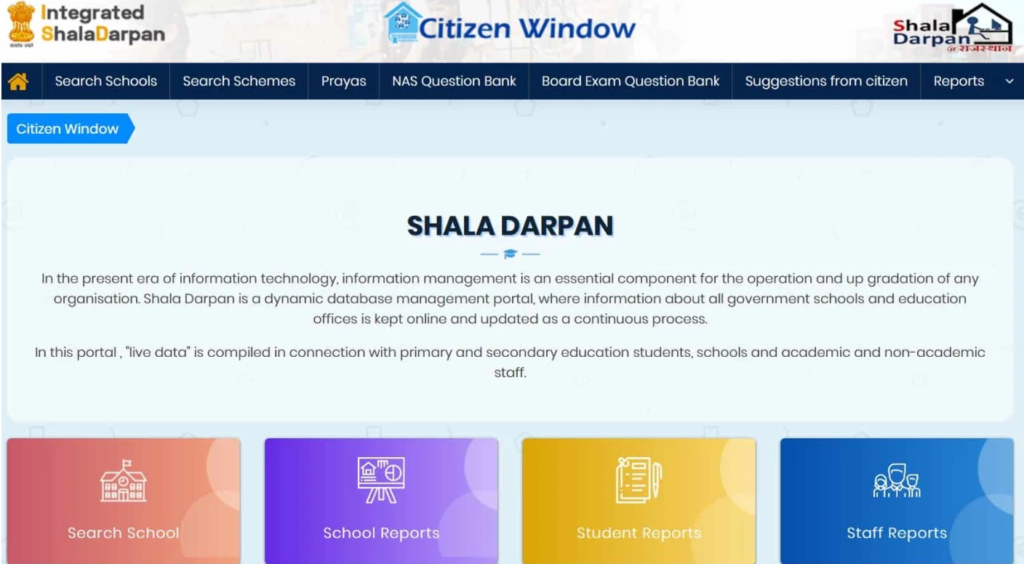
Shala Darpan Citizen Window (शाला दर्पण नागरिक कॉर्नर) राजस्थान शिक्षा विभाग द्वारा बनाया गया एक public portal है जो आम नागरिकों, अभिभावकों और छात्रों के लिए specially designed किया गया है। यह एक transparent, accessible और user-friendly platform है जहां कोई भी व्यक्ति बिना login किए राजस्थान के schools और education system से related जानकारी प्राप्त कर सकता है।
Citizen Window की परिभाषा:
Citizen Window को हम एक digital information hub कह सकते हैं जो:
- राजस्थान के सभी government schools की जानकारी provide करता है
- Educational schemes और scholarships की details देता है
- Student, staff और school reports accessible बनाता है
- Citizens को feedback और suggestions देने का platform provides करता है
- Education system में transparency और accountability बढ़ाता है
Citizen Window का Purpose:
मुख्य उद्देश्य:
- Information Accessibility – शिक्षा से related सभी information को सभी के लिए accessible बनाना
- Transparency – Education system में complete transparency लाना
- Public Participation – नागरिकों को education में actively participate करने का मौका देना
- Informed Decisions – Parents को better school choices के लिए सही जानकारी provide करना
- Accountability – Schools और education department को accountable बनाना
किसके लिए है Citizen Window?
Citizen Window किसी को भी serve करता है:
1. Parents (अभिभावक)
- बच्चों के लिए school search करना
- School की quality और facilities check करना
- Education schemes की जानकारी लेना
- Admission related information प्राप्त करना
2. Students (छात्र)
- Available schools देखना
- Scholarship opportunities जानना
- School reports देखना
- Educational programs की information
3. Citizens (आम नागरिक)
- अपने area के schools की जानकारी
- Education system को monitor करना
- Suggestions और feedback देना
- Community schools की quality check करना
4. Researchers & Educationists
- Educational data analysis
- School statistics
- Research purposes
- Policy studies
5. NGOs & Social Workers
- Education sector में work करने वाले
- School assessment के लिए
- Community development programs
- Educational interventions
Citizen Window की Unique Features:
क्या खास है इसमें:
- No Login Required – बिना registration के सभी services access करें
- Free Access – सभी information बिल्कुल free है
- 24/7 Availability – कभी भी, कहीं भी access करें
- User-Friendly Interface – simple और easy to navigate
- Comprehensive Data – complete और detailed information
- Regular Updates – नियमित रूप से updated data
- Multi-lingual Support – Hindi और English दोनों में
- Mobile Friendly – smartphones पर भी perfectly काम करता है
Shala Darpan Citizen Window की प्रमुख विशेषताएं
Citizen Window कई powerful features से equipped है जो इसे एक complete information portal बनाते हैं।
1. School Search (स्कूल खोजें)
सबसे Popular Feature – इसके माध्यम से आप:
Search Options:
- District और Block wise search
- PIN Code based search
- School name से direct search
- Village/City wise search
- Category wise filtering (Primary, Secondary, Sr. Secondary)
Detailed School Information: जब आप कोई school search करते हैं, तो आपको मिलती है:
- School का complete name और address
- Contact details (phone number, email)
- Principal/Headmaster का name
- Total number of students (boys & girls separately)
- Number of teachers और staff
- Available classes और streams
- Infrastructure details:
- Classrooms की संख्या
- Library facility
- Computer lab
- Science lab
- Playground
- Drinking water facility
- Toilets (boys/girls separate)
- Electricity availability
- School timings
- Medium of instruction (Hindi, English, Sanskrit)
- School NIC-SD ID
Advanced Filters:
- School type (Government, Aided, Private)
- School category (Primary, Upper Primary, Secondary, Sr. Secondary)
- Management type
- Urban/Rural location
- Facilities availability
2. Scheme Search (योजना खोजें)
Government Schemes Information – students के लिए available सभी schemes:
Search Parameters: आप schemes खोज सकते हैं basis पर:
- Gender (Male/Female)
- Category (General, OBC, SC, ST, Minority)
- Class (1st to 12th)
- Age group
- Family income
- BPL status
- Disability status
- Parent occupation
Scheme Details Include:
- Scheme का नाम और type
- Eligibility criteria विस्तार से
- Benefits amount और nature
- Application process
- Required documents
- Last date to apply
- Scheme guidelines PDF download
- Contact information for queries
Popular Schemes Covered:
- Various scholarship schemes
- Free textbook schemes
- Uniform distribution schemes
- Mid-day meal program
- Bicycle distribution
- Digital India initiatives
- Girl child education schemes
- Merit-based scholarships
- Need-based financial assistance
3. School Reports (स्कूल रिपोर्ट)
Comprehensive School Data – विभिन्न प्रकार की reports:
Available Reports:
A. Basic School Information Report
- School profile summary
- Infrastructure details
- Staff strength
- Student enrollment numbers
B. Enrollment Reports
- Class-wise student strength
- Gender-wise distribution
- Category-wise breakup (SC/ST/OBC/General)
- Year-wise enrollment trends
C. Facility Reports
- Available facilities list
- Infrastructure condition
- Equipment availability
- Safety measures
D. Performance Reports
- Exam pass percentages
- Academic achievements
- Co-curricular activities
- Sports achievements
E. Staff Reports
- Teacher-student ratio
- Subject-wise teachers
- Qualified vs unqualified staff
- Vacant positions
Report Formats:
- Online view option
- PDF download available
- Excel export (for some reports)
- Print-friendly format
4. Student Reports (छात्र रिपोर्ट)
Student-Related Information:
Reports Categories:
A. Enrollment Reports
- Total students district-wise
- School-wise student count
- Class-wise distribution
- Gender ratio
- Category-wise data
B. Attendance Reports
- Overall attendance percentage
- Class-wise attendance
- Monthly attendance trends
- Absenteeism patterns
C. Performance Reports
- Exam results statistics
- Pass percentage
- Subject-wise performance
- Toppers information
D. Dropout Analysis
- Dropout rates
- Reasons for dropout
- Gender-wise dropout data
- Intervention measures
E. Scholarship Reports
- Scholarship beneficiaries count
- Scheme-wise distribution
- Amount disbursed
- Pending applications
5. Staff Reports (स्टाफ रिपोर्ट)
Teacher और Staff Related Data:
Available Information:
A. Staff Strength
- Total teachers district/block wise
- Subject-wise teacher count
- Gender distribution
- Category-wise data
B. Qualification Reports
- Educational qualifications
- Professional qualifications
- Training status
- Subject expertise
C. Vacancy Reports
- Sanctioned vs working posts
- Vacant positions
- Subject-wise shortage
- Requirement analysis
D. Transfer Reports
- Recent transfers
- Transfer history
- Posting details
- Transfer statistics
E. Training Reports
- Training participation
- Completed trainings
- Pending trainings
- Skill development programs
6. Suggestion from Citizens (नागरिकों से सुझाव)
Public Feedback Mechanism:
Features:
- Online suggestion submission
- Complaint registration
- Appreciation feedback
- Improvement ideas
What You Can Report/Suggest:
- School-related issues
- Teacher performance concerns
- Infrastructure problems
- Scheme implementation issues
- Administrative matters
- Quality of education concerns
- Any constructive suggestions
Process:
- Fill online feedback form
- Select issue category
- Provide detailed description
- Upload supporting documents (optional)
- Submit anonymously या with contact details
- Track status of your submission
7. Additional Services
Other Useful Features:
A. Important Links
- Department websites
- Related portals
- Official notifications
- Guidelines और circulars
- News और updates
B. Downloads Section
- Forms और applications
- Guidelines PDFs
- Notification copies
- Reports और statistics
- Policy documents
C. Contact Information
- Helpline numbers
- Email addresses
- Office addresses
- Office timing
- District-wise contacts
D. FAQ Section
- Common questions
- Process guides
- Troubleshooting tips
- User manuals
Shala Darpan School Search – विस्तृत प्रक्रिया
School search करना Citizen Window की सबसे महत्वपूर्ण और frequently used service है। आइए step-by-step समझें।
School Search करने की Complete Process:
स्टेप 1: Citizen Window Access करें
Portal खोलना:
- अपने browser में rajshaladarpan.nic.in type करें
- Homepage load होने का wait करें
- Page को नीचे scroll करें
- “Citizen Window” या “नागरिक कॉर्नर” button दिखेगा
- इस button पर click करें
- Citizen Window page खुल जाएगा
Alternative Methods:
- Direct link: rajshaladarpan.nic.in/CitizenCorner
- Google search: “Shala Darpan Citizen Window”
- Homepage पर menu में “Citizen Corner” option
स्टेप 2: School Search Option Select करें
Citizen Window Page पर:
- आपको various services की list दिखेगी
- “Search Schools” या “स्कूल खोजें” option खोजें
- यह generally first या top option होता है
- इस option पर click करें
- School Search page खुल जाएगा
स्टेप 3: School Type Select करें
School Category चुनना:
Page पर आपको school type select करने के options मिलेंगे:
Option 1: School Management
- Government (सरकारी स्कूल)
- Government Aided (सहायता प्राप्त)
- Private (निजी)
- All (सभी types)
Option 2: School Category
- Primary School (कक्षा 1-5)
- Upper Primary (कक्षा 6-8)
- Secondary School (कक्षा 9-10)
- Sr. Secondary School (कक्षा 11-12)
Pro Tip: अगर आपको नहीं पता कि कौन सा select करें, तो “All” option चुनें, बाद में filter कर सकते हैं।
स्टेप 4: Search Method Choose करें
दो मुख्य search methods available हैं:
Method A: By District/Block (जिला/ब्लॉक द्वारा)
यह method तब use करें जब:
- आप specific area में school खोज रहे हों
- आपको school का नाम exact पता नहीं है
- आप area के सभी schools देखना चाहते हैं
Process:
- “By District/Block” radio button select करें
- District dropdown खोलें और अपना जिला चुनें
- उदाहरण: Jaipur, Jodhpur, Udaipur, Kota, etc.
- District select करने के बाद Block dropdown active हो जाएगा
- अपना Block चुनें
- हर district में multiple blocks होते हैं
- आप Panchayat Samiti भी select कर सकते हैं (optional)
- और भी specific results के लिए Village/Town भी select कर सकते हैं (optional)
Method B: By PIN Code (पिन कोड द्वारा)
यह method तब use करें जब:
- आपको area का exact PIN code पता है
- आप बहुत specific location में schools खोज रहे हैं
- Quick search चाहिए
Process:
- “By PIN Code” radio button select करें
- PIN Code field में 6-digit PIN code enter करें
- Example: 302001, 302015, etc.
- Ensure करें कि PIN code सही है
- यह method usually faster results देता है
स्टेप 5: Additional Filters Apply करें (Optional)
Advanced Filtering Options:
कुछ pages पर additional filters भी available होते हैं:
A. School Level
- Pre-Primary
- Primary (1-5)
- Upper Primary (6-8)
- Secondary (9-10)
- Sr. Secondary (11-12)
B. Medium of Instruction
- Hindi Medium
- English Medium
- Sanskrit Medium
- Mixed Medium
C. Urban/Rural
- Urban schools
- Rural schools
- Both
D. Special Features
- With Computer Lab
- With Science Lab
- With Library
- With Playground
- Co-education या Boys/Girls school
E. Management Type
- State Government
- Central Government
- Government Aided
- Private Aided
- Unaided Private
स्टेप 6: Captcha Code Enter करें
Security Verification:
- Page पर एक Captcha box दिखेगा
- Image में displayed characters को carefully देखें
- Characters को exactly same type करें
- Case-sensitive है (Capital और small letters का ध्यान रखें)
- Numbers और letters को clearly distinguish करें
- अगर captcha clear नहीं दिख रहा, तो refresh icon पर click करके new captcha generate करें
- सही captcha enter करना बहुत जरूरी है वरना search काम नहीं करेगी
Captcha Tips:
- Zoom in करके clearly देखें
- Confusing characters (0/O, 1/l/I) को carefully identify करें
- अगर 2-3 बार गलत हो जाए, तो page refresh करें
स्टेप 7: Search Button Click करें
Search Execute करना:
- सभी fields को एक बार फिर से verify करें:
- School type सही है?
- District/Block या PIN code सही है?
- Captcha correct है?
- “Search” या “खोजें” या “Go” button पर click करें
- Button click करते ही process start हो जाएगी
- Loading symbol या “Please wait” message आ सकता है
- थोड़ा wait करें (usually 2-10 seconds)
स्टेप 8: Search Results देखें
Results Page Analysis:
Search successful होने के बाद results page खुलेगा जिसमें:
Table Format में Data:
| Sr. No. | School Name | Location | Category | Students | School ID | Actions |
|---|---|---|---|---|---|---|
| 1 | GSSS Jaipur | Malviya Nagar | Sr. Sec | 1200 | 12345 | View Details |
| 2 | GPS Mansarovar | Mansarovar | Primary | 350 | 67890 | View Details |
Information Columns:
- Sr. Number: List में school की position
- School Name: School का complete official name
- Block/Village: Location details
- Category: School type (Primary/Secondary/etc.)
- Region: Urban/Rural classification
- School NIC-SD ID: Unique identification number
- View Details: More information के लिए link
Results Count:
- Total कितने schools found हुए
- Pagination (अगर results ज्यादा हैं तो pages में divide होंगे)
- Per page usually 10-20 schools display होते हैं
स्टेप 9: School Details देखें
Detailed Information Access:
किसी specific school की complete information देखने के लिए:
- Results table में interested school की row खोजें
- School name पर click करें या “View Details” button पर click करें
- एक नया page खुलेगा School Profile Page के साथ
School Profile में Available Information:
A. Basic Information
- Complete school name (Hindi और English)
- School address (detailed)
- Block, District, State
- PIN Code
- Contact number
- Email ID (if available)
- School website (if available)
- School NIC-SD ID
- UDISE Code
- Year of establishment
B. Administrative Details
- Principal/Headmaster name
- School management type
- School category
- Recognition status
- Affiliation board (RBSE, CBSE, etc.)
- Medium of instruction
- School timing (morning/evening shift)
C. Infrastructure Details
- Total number of classrooms
- Library – Yes/No, Books count
- Computer Lab – Yes/No, Computers count
- Science Lab – Physics/Chemistry/Biology
- Playground area
- Building type (Pucca/Kuccha)
- Boundary wall – Yes/No
- Electricity connection
- Drinking water facility
- Toilet facilities:
- Boys toilets count
- Girls toilets count
- Working condition
- Ramp for disabled students
- Medical room
- Principal room
- Staff room
- Store room
- Kitchen (for mid-day meal)
D. Student Information
- Total students enrolled
- Class-wise distribution
- Boys count
- Girls count
- Category wise (SC/ST/OBC/General/Minority)
- CWSN (Children with Special Needs) count
E. Staff Information
- Total teaching staff
- Subject-wise teachers
- Male/Female teachers
- Sanctioned posts vs working posts
- Vacant positions
- Non-teaching staff count
F. Academic Details
- Classes offered (1st to which class)
- Streams available (Science/Commerce/Arts)
- Subjects taught
- Optional subjects
- Vocational courses (if any)
- Extra-curricular activities
G. Facilities & Amenities
- Transportation facility
- Hostel facility
- Canteen
- Sports facilities
- Music/Dance room
- Smart classrooms
- Internet connectivity
- CCTV cameras
H. Recent Performance
- Board exam results (last 2-3 years)
- Pass percentage
- Students in first division
- Any special achievements
- Awards received
I. Contact Information for Parents
- School phone number
- Principal’s contact (if available)
- Best time to visit
- Admission inquiry contact
स्टेप 10: Compare Schools (Optional)
Multiple Schools Comparison:
अगर आप multiple schools में se best choose करना चाहते हैं:
- Shortlist करें: Notepad में या screenshot लेकर 3-5 schools को shortlist करें
- Parameters Compare करें:
- Student-teacher ratio
- Infrastructure facilities
- Board exam results
- Distance from home
- Fees structure (for private schools)
- Reviews और reputation
- Pros & Cons List बनाएं
- Priority Set करें: अपनी priorities (academics, distance, facilities, etc.) के according
- Final Decision लें
School Search में आने वाली Common Problems और Solutions:
समस्या 1: “No Schools Found” Message
कारण:
- Selection criteria बहुत specific है
- उस area में वह type के schools नहीं हैं
- Data update नहीं है
समाधान:
- Broader search criteria use करें
- Filters कम करें
- Adjacent blocks भी try करें
- “All” options select करके दोबारा search करें
समस्या 2: Too Many Results (बहुत ज्यादा results)
समाधान:
- More specific filters apply करें
- PIN Code method use करें
- Village/Town level तक narrow down करें
- School category specific select करें
समस्या 3: School Details Incomplete या Outdated
कारण:
- School ने recent data update नहीं किया
- System में pending updates
समाधान:
- School को directly contact करें (phone number use करें)
- Personal visit recommend है final admission के लिए
- Block education office में inquiry करें
समस्या 4: Page Loading Slow या Not Responding
समाधान:
- Internet connection check करें
- Page refresh (F5) करें
- Browser cache clear करें
- Different time try करें (peak hours avoid करें)
- Different browser use करें
School Selection Tips – बेहतर School चुनने के लिए:
1. Location Consideration:
- घर से distance कितनी है?
- Transportation सुविधा available है?
- Safety और security
- आसपास का environment
2. Infrastructure Check:
- Basic facilities (toilets, drinking water) proper हैं?
- Labs और library की condition
- Classroom space adequate है?
- Sports facilities
3. Academic Performance:
- पिछले years के board results
- Pass percentage trends
- Teachers’ qualifications
- Student-teacher ratio
4. Additional Factors:
- Extra-curricular activities
- School discipline और culture
- Parent-teacher interaction
- Fee structure (for aided/private schools)
5. Physical Visit: Online information के बाद:
- School की physical visit जरूर करें
- Principal से बात करें
- School campus देखें
- Current students/parents से feedback लें
Shala Darpan Scheme Search – योजना खोजने की प्रक्रिया
Scheme Search छात्रों के लिए available government schemes और scholarships खोजने का एक powerful tool है।
Scheme Search करने की Complete Process:
स्टेप 1: Scheme Search Option Access करें
- Citizen Window page पर जाएं
- “Search Schemes” या “योजना खोजें” option पर click करें
- Scheme search form page खुल जाएगा
स्टेप 2: Student Details भरें
Basic Information:
A. Gender (लिंग)
- Male (पुरुष)
- Female (महिला)
- Select करें applicant का gender
B. Minority Status (अल्पसंख्यक स्थिति)
- Yes – अगर applicant minority community से है
- No – अगर नहीं है
C. BPL Status (Below Poverty Line)
- Yes – अगर family BPL category में है
- No – अगर नहीं है
- BPL card holder schemes के लिए eligible होते हैं
स्टेप 3: Personal Details दर्ज करें
Detailed Information:
A. Age (आयु)
- Current age enter करें
- Format: Years में
- Example: 15, 16, 17, etc.
B. Class/Standard (कक्षा)
- Current class select करें
- Dropdown से चुनें: 1st to 12th
- कुछ schemes specific classes के लिए होती हैं
C. Caste Category (जाति) Select from:
- General (सामान्य)
- OBC (Other Backward Class – अन्य पिछड़ा वर्ग)
- SC (Scheduled Caste – अनुसूचित जाति)
- ST (Scheduled Tribe – अनुसूचित जनजाति)
- SBC (Special Backward Class)
D. Family Annual Income (पारिवारिक वार्षिक आय)
- Rupees में enter करें
- Example: 50000, 100000, 200000
- Income certificate के according
- बहुत सी schemes income limit based होती हैं
स्टेप 4: Additional Details (Optional but Recommended)
Extra Information:
A. Disability Status
- Yes/No
- Type of disability (if applicable)
- Disability percentage
- Special schemes available for differently-abled students
B. Parent’s Occupation
- Farmer
- Government Employee
- Private Employee
- Self-employed
- Daily wage worker
- Unemployed
C. Residential Area
- Urban
- Rural
- Some schemes area-specific होती हैं
D. Previous Academic Performance
- Percentage in last exam
- Merit-based schemes के लिए
स्टेप 5: Captcha Code और Search
- Captcha code carefully type करें
- All details verify करें
- “Search” button click करें
- Processing के लिए थोड़ा wait करें
स्टेप 6: Results देखें और Analyze करें
Search Results में:
Schemes List Display:
- Scheme का नाम
- Brief description
- Eligibility match percentage
- “View Details” option
For Each Scheme:
A. Scheme Name और Type
- Official scheme name
- Category (Scholarship, Financial Aid, In-kind Support)
- Implementing department
B. Eligibility Criteria
- Detailed requirements
- Who can apply
- Essential documents
C. Benefits
- Financial amount (if monetary)
- In-kind benefits
- Duration of benefit
- Payment mode और frequency
D. Application Process
- Online/Offline application
- Required documents list
- Where to submit
- Application fee (if any)
E. Important Dates
- Opening date
- Closing date
- Selection process timeline
- Disbursement schedule
F. Selection Process
- Merit-based/Need-based
- Selection criteria
- Number of beneficiaries
- Verification process
G. Contact Information
- Helpline number
- Email ID
- Office address
- Query resolution process
Popular Government Schemes (उदाहरण)
1. मुख्यमंत्री बालिका प्रोत्साहन योजना
- For girl students
- Merit-based scholarship
- Class 10th और 12th के लिए
2. अल्पसंख्यक छात्रवृत्ति योजना
- Minority community students के लिए
- Income-based eligibility
- Class 1st to 10th
3. अनुसूचित जाति छात्रवृत्ति
- SC category students
- Pre-matric और Post-matric
- Different amounts for different classes
4. निःशक्तजन छात्रवृत्ति
- Differently-abled students के लिए
- 40% या अधिक disability
- Special financial assistance
5. मुफ्त साइकिल वितरण योजना
- Class 6th या 9th में promoted students
- Rural area students को priority
- School से 2km+ दूरी वाले
Shala Darpan Citizen Window का महत्व – Importance
Citizen Window ने राजस्थान की education system में revolutionary changes लाए हैं।
समाज के लिए महत्व:
1. Transparency (पारदर्शिता)
कैसे transparency बढ़ती है:
- सभी school data publicly available
- Government schemes की clear information
- Budget allocation visibility
- Implementation monitoring
- Accountability mechanisms
Benefits:
- Corruption कम होती है
- Misuse of funds prevent होता है
- Public trust बढ़ता है
- Better governance
2. Accessibility (सुलभता)
Easy Access के फायदे:
- कोई भी, कहीं से भी access कर सकता है
- 24/7 availability
- No registration hassles
- Free of cost
- User-friendly interface
Impact:
- Information gap कम होती है
- Rural areas में भी awareness बढ़ती है
- Digital divide bridge होता है
3. Informed Decision Making (सूचित निर्णय)
Parents के लिए:
- School की quality का proper assessment
- Comparative analysis possible
- Infrastructure की complete information
- Academic performance data
- Better school choice
Students के लिए:
- Available schemes की जानकारी
- Scholarship opportunities
- Career guidance information
- Educational options
4. Public Participation (जन भागीदारी)
Citizen Engagement:
- Feedback mechanism
- Suggestions को value मिलती है
- Community involvement
- Democratic process
Impact:
- Education quality में सुधार
- Government को grassroot feedback
- Policy improvements
- Citizen empowerment
5. Monitoring और Evaluation
Continuous Monitoring:
- School performance track कर सकते हैं
- Trends identify कर सकते हैं
- Problems early detect हो सकती हैं
- Interventions timely हो सकती हैं
Data-Driven Decisions:
- Policy makers को accurate data
- Research और analysis के लिए
- Evidence-based planning
6. Accountability (जवाबदेही)
Schools की Accountability:
- Performance publicly visible
- Infrastructure gaps exposed
- Teacher attendance monitored
- Fund utilization transparent
Department की Accountability:
- Scheme implementation tracking
- Response to complaints
- Action on suggestions
- Timely updates
Education System के लिए Impact:
1. Quality Improvement
- Competition बढ़ती है
- Schools improvement के लिए motivated होते हैं
- Best practices share होती हैं
2. Resource Optimization
- Gaps identify होती हैं
- Resources properly allocate होते हैं
- Wastage कम होती है
3. Student Outcomes
- Better schools मिलते हैं
- More scholarships accessible
- Dropout rates कम होती हैं
- Academic performance बढ़ती है
4. Parent Engagement
- Parents more involved होते हैं
- Regular monitoring करते हैं
- School-parent coordination बेहतर होता है
5. Digital Transformation
- Education sector में digitalization
- Modern technology adoption
- Paperless processes
- Efficiency बढ़ती है
Frequently Asked Questions
प्रश्न 1: Shala Darpan Citizen Window क्या है और इससे आप क्या समझते है?
विस्तृत उत्तर: Shala Darpan Citizen Window एक online public portal है जो राजस्थान शिक्षा विभाग द्वारा संचालित है। यह specifically आम नागरिकों, अभिभावकों और छात्रों के लिए बनाया गया है। इस platform के माध्यम से कोई भी व्यक्ति बिना किसी login या registration के राजस्थान के सभी government schools, educational schemes, student reports, staff information और अन्य education-related data को access कर सकता है।
मुख्य समझ:
- यह एक information gateway है education system के बारे में
- No login required – सभी के लिए खुला
- Free access – कोई charges नहीं
- Comprehensive data – complete information एक जगह पर
- User-friendly – आसानी से use कर सकते हैं
- 24/7 available – कभी भी access करें
Purpose: Citizen Window का मुख्य purpose है education में transparency लाना, citizens को empower करना और informed decisions लेने में help करना। यह government और public के बीच bridge की तरह काम करता है।
प्रश्न 2: क्या मुझे Shala Darpan Citizen Window पर अपने आसपास के स्कूलों की जानकारी मिल सकती है?
हाँ, बिल्कुल! Citizen Window पर school search feature के through आप अपने area के सभी schools की complete information प्राप्त कर सकते हैं।
कैसे खोजें:
Method 1: District/Block से
- अपना district select करें
- Block choose करें
- Village/town level तक narrow down करें
- सभी nearby schools की list मिलेगी
Method 2: PIN Code से
- अपने area का PIN code enter करें
- उस PIN code area के सभी schools दिखेंगे
- यह most accurate method है
मिलने वाली Information: आपको हर school के बारे में मिलेगा:
- School का नाम और exact address
- Contact number और email
- Principal का name
- Total students count
- Infrastructure facilities detail:
- Classrooms, labs, library
- Playground, toilets
- Drinking water, electricity
- Academic performance
- Teacher strength
- School timings
- Medium of instruction
Additional Benefits:
- Multiple schools को compare कर सकते हैं
- अपने बच्चे के लिए best school select कर सकते हैं
- Admission के लिए direct contact information मिलता है
- School visit करने से पहले complete research कर सकते हैं
प्रश्न 3: क्या कोई भी Citizen Window का इस्तेमाल कर सकता है?
हाँ, बिल्कुल! Citizen Window सभी के लिए freely accessible है।
कौन Use कर सकता है:
1. Parents (अभिभावक)
- बच्चों के लिए school research
- Schemes information
- School performance monitoring
2. Students (छात्र)
- Scholarship opportunities
- School information
- Career guidance resources
3. General Citizens (आम नागरिक)
- Community schools की information
- Education system monitoring
- Research purposes
4. Researchers & Academicians
- Educational data analysis
- Policy studies
- Academic research
5. Media & Journalists
- Education sector reporting
- Investigation purposes
- Public awareness
6. NGOs & Social Workers
- Community development work
- Educational interventions
- Data collection
7. Government Officials (other departments)
- Cross-department coordination
- Planning purposes
- Resource allocation
कोई Restrictions नहीं:
- No age limit
- No qualification requirement
- No registration needed
- No verification process
- No fees या charges
- Access from anywhere
- Use anytime
Privacy Note: चूंकि यह public data है, कोई भी access कर सकता है। Personal या confidential information publicly available नहीं है।
प्रश्न 4: Citizen Window पर हमे किस प्रकार की जानकारी मिल सकती है?
Citizen Window पर बहुत comprehensive information available है:
A. School-Related Information:
1. Basic School Data
- Complete name और address
- Contact details
- Principal information
- School category और type
- Management type
- NIC-SD ID और UDISE code
2. Infrastructure Details
- Building type और condition
- Number of classrooms
- Laboratory facilities:
- Computer lab
- Science lab (Physics, Chemistry, Biology)
- Library – books count
- Playground area
- Toilets (boys/girls)
- Drinking water facility
- Electricity availability
- Boundary wall
- Ramp for disabled
- Other facilities
3. Student Information
- Total enrollment
- Class-wise distribution
- Boys और girls separately
- Category-wise (SC/ST/OBC/General)
- CWSN students
- Year-wise trends
4. Staff Information
- Total teachers count
- Subject-wise teachers
- Male/Female ratio
- Qualified vs unqualified
- Sanctioned vs working posts
- Vacant positions
- Non-teaching staff
5. Academic Performance
- Board exam results
- Pass percentages
- Class-wise performance
- Year-wise trends
- Achievements
B. Scheme-Related Information:
1. Scholarship Schemes
- Merit-based scholarships
- Need-based financial assistance
- Category-specific schemes
- Girl child schemes
- Minority schemes
2. Welfare Schemes
- Free textbooks
- Free uniforms
- Mid-day meal
- Bicycle distribution
- Other welfare programs
3. Scheme Details
- Eligibility criteria
- Benefits amount
- Application process
- Required documents
- Important dates
- Contact information
C. Reports और Statistics:
1. School Reports
- District-wise school count
- Category-wise distribution
- Infrastructure status
- Performance analysis
2. Student Reports
- Enrollment statistics
- Attendance data
- Performance reports
- Dropout analysis
- Scholarship beneficiaries
3. Staff Reports
- Teacher strength
- Qualification status
- Vacancy position
- Transfer data
- Training status
D. Additional Services:
1. Suggestion Mechanism
- Feedback form
- Complaint registration
- Appreciation platform
2. Downloads
- Forms और applications
- Guidelines
- Circulars
- Notifications
3. Contact Information
- Helpline numbers
- Email addresses
- Office addresses
- District-wise contacts
4. Important Links
- Related portals
- Department websites
- Useful resources
प्रश्न 5: Citizen Window use करने के लिए कोई fees है क्या?
बिल्कुल नहीं! Citizen Window completely free है।
No Charges:
- Access करने के लिए – Free
- School search के लिए – Free
- Reports देखने के लिए – Free
- Data download करने के लिए – Free
- Schemes information के लिए – Free
- Suggestion submit करने के लिए – Free
क्या चाहिए:
- बस internet connection
- Computer, laptop या smartphone
- Web browser (Chrome, Firefox, etc.)
प्रश्न 6: क्या Citizen Window mobile पर भी काम करता है?
हाँ, perfectly काम करता है!
Mobile Compatibility:
- Portal fully mobile-responsive है
- Smartphones और tablets पर आसानी से चलता है
- Touch-friendly interface
- सभी features mobile पर accessible
How to Access on Mobile:
- Mobile browser (Chrome/Firefox) खोलें
- rajshaladarpan.nic.in type करें
- Page automatically mobile view में adjust हो जाएगा
- Normal use करें
Tips:
- Landscape mode बेहतर experience के लिए
- Stable internet connection use करें
- Zoom in/out feature use कर सकते हैं
प्रश्न 7: अगर school की information गलत या outdated है तो क्या करें?
Solution:
1. Direct School Contact
- School को phone या email करें
- Correct information request करें
- Updated data की copy मांगें
2. Block Education Office
- अपने block के education office में complaint करें
- Written complaint submit करें
- Follow-up regularly करें
3. Feedback on Portal
- Citizen Window पर feedback form भरें
- Issue detail mention करें
- Screenshot attach करें (if possible)
4. Helpline
- 0141-2700872, 0141-2711964 पर call करें
- Issue explain करें
- Reference number note करें
What Information to Provide:
- School name और NIC-SD ID
- What information is wrong
- What should be the correct information
- Your contact details (for follow-up)
प्रश्न 8: Citizen Window पर suggestions कैसे दें?
Process:
- Citizen Window page पर जाएं
- “Suggestion from Citizens” option select करें
- Feedback form खुलेगा
- Details भरें:
- Your name (optional)
- Contact details (optional for follow-up)
- Category (School/Staff/Scheme/System)
- Detailed description
- Supporting documents (if any)
- Captcha fill करें
- Submit button click करें
- Acknowledgement number save करें
What You Can Suggest:
- School improvement ideas
- System enhancement suggestions
- Scheme modifications
- New features requests
- Process simplification ideas
- Any constructive feedback
निष्कर्ष – Conclusion
Shala Darpan Citizen Window राजस्थान education system में transparency और accessibility का एक outstanding example है। यह portal citizens को empower करता है और education में active participation को encourage करता है।
Key Takeaways:
- Free और Easy Access – कोई भी, कभी भी use कर सकता है
- Comprehensive Information – schools, schemes, reports सब कुछ
- No Login Required – direct access without hassles
- Mobile Friendly – smartphones पर भी perfectly काम करता है
- Regular Updates – latest information हमेशा available
- Transparent System – complete visibility
- Public Participation – feedback और suggestions welcome
How to Make Best Use:
- Regular Monitoring – अपने area के schools को regularly track करें
- Scheme Awareness – available schemes की जानकारी रखें और eligible हों तो apply करें
- Informed Decisions – data analysis करके better choices लें
- Active Participation – suggestions और feedback regularly दें
- Spread Awareness – दूसरों को भी इस portal के बारे में बताएं
यह portal केवल information देने का माध्यम नहीं है, बल्कि education system को collectively बेहतर बनाने का platform है। आइए इसका सही उपयोग करें और राजस्थान की education quality को improve करने में योगदान दें।